

Membunuh Pemain
Kita bisa membunuh musuh dengan melompat ke arah mereka, tetapi pemain tetap tidak bisa mati. Mari kita perbaiki ini.
Kami ingin mendeteksi serangan musuh secara berbeda dari menghancurkan mereka. Kami ingin pemain mati saat mereka bergerak di lantai, tetapi tidak jika mereka berada di udara. Kami dapat menggunakan matematika vektor untuk membedakan kedua jenis tabrakan. Namun, sebagai gantinya, kami akan menggunakan node Area3D , yang berfungsi dengan baik untuk hitbox.
Hitbox dengan simpul Area
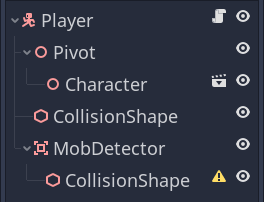
Kembali ke player.tscnadegan dan tambahkan simpul anak baru Area3D . Beri nama MobDetector Tambahkan simpul CollisionShape3D sebagai anak simpul tersebut.
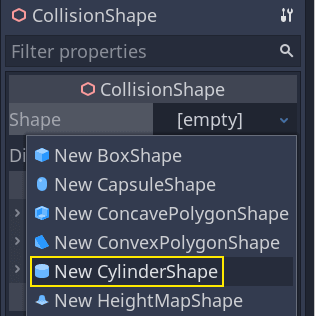
Di Inspektur , tetapkan bentuk silinder padanya.
Berikut trik yang dapat Anda gunakan untuk membuat tabrakan hanya terjadi saat pemain berada di tanah atau dekat dengannya. Anda dapat mengurangi tinggi silinder dan memindahkannya ke atas karakter. Dengan cara ini, saat pemain melompat, bentuknya akan terlalu tinggi sehingga musuh tidak dapat bertabrakan dengannya.
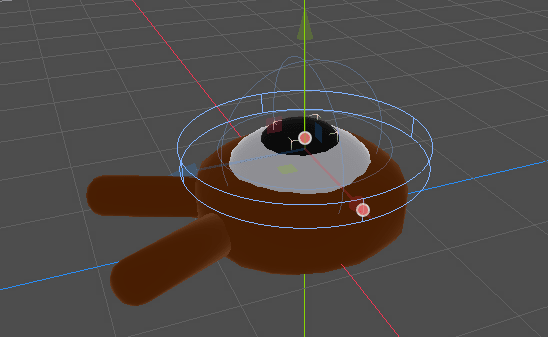
Anda juga ingin silinder lebih lebar daripada bola. Dengan cara ini, pemain akan terkena pukulan sebelum bertabrakan dan terdorong ke atas kotak tabrakan monster.
Semakin lebar silindernya, semakin mudah pemain terbunuh.
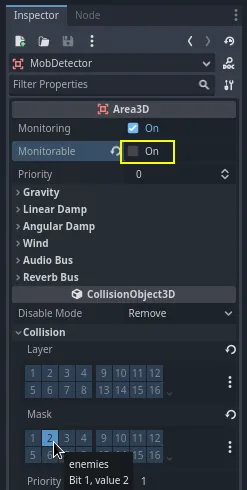
Selanjutnya, pilih MobDetectornode tersebut lagi, dan di Inspector , matikan properti Monitorable -nya . Ini membuatnya sehingga node fisika lain tidak dapat mendeteksi area tersebut. Properti Monitoring yang melengkapi memungkinkannya untuk mendeteksi tabrakan. Kemudian, hapus Collision -> Layer dan atur mask ke layer "enemies".
Ketika area mendeteksi tabrakan, mereka memancarkan sinyal. Kita akan menghubungkan satu ke Playernode. Pilih MobDetectordan buka tab Node milik Inspector , klik dua kali sinyal dan hubungkan ke node.body_enteredPlayer
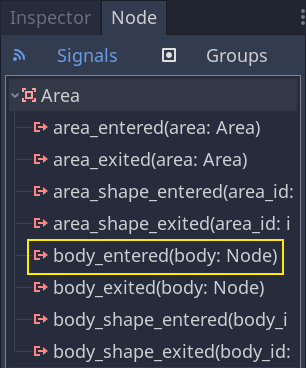
MobDetector akan memancarkan sinyal saatbody_entered sebuah node CharacterBody3D atau RigidBody3D memasukinya. Karena hanya menutupi lapisan fisika "musuh", maka ia hanya akan mendeteksi Mobnode.
Dari segi kode, kita akan melakukan dua hal: memancarkan sinyal yang nantinya akan kita gunakan untuk mengakhiri permainan dan menghancurkan pemain. Kita dapat membungkus operasi ini dalam suatu die()fungsi yang membantu kita memberi label deskriptif pada kode.
# Emitted when the player was hit by a mob.
# Put this at the top of the script.
signal hit


# And this function at the bottom.
func die():
	hit.emit()
	queue_free()


func _on_mob_detector_body_entered(body):
	die()
// Don't forget to rebuild the project so the editor knows about the new signal.

// Emitted when the player was hit by a mob.
[Signal]
public delegate void HitEventHandler();

// ...

private void Die()
{
    EmitSignal(SignalName.Hit);
    QueueFree();
}

// We also specified this function name in PascalCase in the editor's connection window.
private void OnMobDetectorBodyEntered(Node3D body)
{
    Die();
}
Mengakhiri permainan
Kita dapat menggunakan sinyal Player's hituntuk mengakhiri permainan. Yang perlu kita lakukan adalah menghubungkannya ke Mainnode dan menghentikan MobTimerreaksi.
Buka main.tscn, pilih Playernode, dan di dok Node , hubungkan sinyalnya hitke Mainnode.
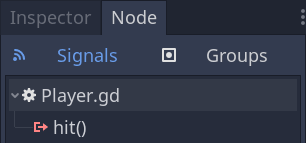
Dapatkan pengatur waktu, dan hentikan, dalam _on_player_hit()fungsi tersebut.
func _on_player_hit():
	$MobTimer.stop()
// We also specified this function name in PascalCase in the editor's connection window.
private void OnPlayerHit()
{
    GetNode<Timer>("MobTimer").Stop();
}
Jika Anda mencoba permainan sekarang, monster akan berhenti muncul saat Anda mati, dan monster yang tersisa akan meninggalkan layar.
Perhatikan juga bahwa permainan tidak lagi mogok atau menampilkan kesalahan saat pemain meninggal. Karena kita menghentikan MobTimer, maka _on_mob_timer_timeout()fungsi tersebut tidak lagi terpicu.
Perhatikan juga bahwa musuh yang bertabrakan dengan pemain dan mati bergantung pada ukuran dan posisi bentuk Playertabrakan Mob. Anda mungkin perlu memindahkan dan mengubah ukurannya untuk mendapatkan nuansa permainan yang ketat.
Anda boleh menepuk punggung Anda sendiri: Anda telah membuat prototipe permainan 3D yang lengkap, meskipun masih agak kasar.
Dari sana, kami akan menambahkan skor, opsi untuk mencoba lagi permainan, dan Anda akan melihat bagaimana Anda dapat membuat permainan terasa lebih hidup dengan animasi minimalis.
Titik pemeriksaan kode
Berikut skrip lengkap untuk node Main, Mob, dan Player, sebagai referensi. Anda dapat menggunakannya untuk membandingkan dan memeriksa kode Anda.
Dimulai dengan main.gd.
extends Node

@export var mob_scene: PackedScene


func _on_mob_timer_timeout():
	# Create a new instance of the Mob scene.
	var mob = mob_scene.instantiate()

	# Choose a random location on the SpawnPath.
	# We store the reference to the SpawnLocation node.
	var mob_spawn_location = get_node("SpawnPath/SpawnLocation")
	# And give it a random offset.
	mob_spawn_location.progress_ratio = randf()

	var player_position = $Player.position
	mob.initialize(mob_spawn_location.position, player_position)

	# Spawn the mob by adding it to the Main scene.
	add_child(mob)

func _on_player_hit():
	$MobTimer.stop()
using Godot;

public partial class Main : Node
{
    [Export]
    public PackedScene MobScene { get; set; }

    private void OnMobTimerTimeout()
    {
        // Create a new instance of the Mob scene.
        Mob mob = MobScene.Instantiate<Mob>();

        // Choose a random location on the SpawnPath.
        // We store the reference to the SpawnLocation node.
        var mobSpawnLocation = GetNode<PathFollow3D>("SpawnPath/SpawnLocation");
        // And give it a random offset.
        mobSpawnLocation.ProgressRatio = GD.Randf();

        Vector3 playerPosition = GetNode<Player>("Player").Position;
        mob.Initialize(mobSpawnLocation.Position, playerPosition);

        // Spawn the mob by adding it to the Main scene.
        AddChild(mob);
    }

    private void OnPlayerHit()
    {
        GetNode<Timer>("MobTimer").Stop();
    }
}
Berikutnya adalah mob.gd.
extends CharacterBody3D

# Minimum speed of the mob in meters per second.
@export var min_speed = 10
# Maximum speed of the mob in meters per second.
@export var max_speed = 18

# Emitted when the player jumped on the mob
signal squashed

func _physics_process(_delta):
	move_and_slide()

# This function will be called from the Main scene.
func initialize(start_position, player_position):
	# We position the mob by placing it at start_position
	# and rotate it towards player_position, so it looks at the player.
	look_at_from_position(start_position, player_position, Vector3.UP)
	# Rotate this mob randomly within range of -45 and +45 degrees,
	# so that it doesn't move directly towards the player.
	rotate_y(randf_range(-PI / 4, PI / 4))

	# We calculate a random speed (integer)
	var random_speed = randi_range(min_speed, max_speed)
	# We calculate a forward velocity that represents the speed.
	velocity = Vector3.FORWARD * random_speed
	# We then rotate the velocity vector based on the mob's Y rotation
	# in order to move in the direction the mob is looking.
	velocity = velocity.rotated(Vector3.UP, rotation.y)

func _on_visible_on_screen_notifier_3d_screen_exited():
	queue_free()

func squash():
	squashed.emit()
	queue_free() # Destroy this node
using Godot;

public partial class Mob : CharacterBody3D
{
    // Emitted when the played jumped on the mob.
    [Signal]
    public delegate void SquashedEventHandler();

    // Minimum speed of the mob in meters per second
    [Export]
    public int MinSpeed { get; set; } = 10;
    // Maximum speed of the mob in meters per second
    [Export]
    public int MaxSpeed { get; set; } = 18;

    public override void _PhysicsProcess(double delta)
    {
        MoveAndSlide();
    }

    // This function will be called from the Main scene.
    public void Initialize(Vector3 startPosition, Vector3 playerPosition)
    {
        // We position the mob by placing it at startPosition
        // and rotate it towards playerPosition, so it looks at the player.
        LookAtFromPosition(startPosition, playerPosition, Vector3.Up);
        // Rotate this mob randomly within range of -45 and +45 degrees,
        // so that it doesn't move directly towards the player.
        RotateY((float)GD.RandRange(-Mathf.Pi / 4.0, Mathf.Pi / 4.0));

        // We calculate a random speed (integer)
        int randomSpeed = GD.RandRange(MinSpeed, MaxSpeed);
        // We calculate a forward velocity that represents the speed.
        Velocity = Vector3.Forward * randomSpeed;
        // We then rotate the velocity vector based on the mob's Y rotation
        // in order to move in the direction the mob is looking.
        Velocity = Velocity.Rotated(Vector3.Up, Rotation.Y);
    }

    public void Squash()
    {
        EmitSignal(SignalName.Squashed);
        QueueFree(); // Destroy this node
    }

    private void OnVisibilityNotifierScreenExited()
    {
        QueueFree();
    }
}
Terakhir, skrip terpanjang, player.gd:
extends CharacterBody3D

signal hit

# How fast the player moves in meters per second
@export var speed = 14
# The downward acceleration while in the air, in meters per second squared.
@export var fall_acceleration = 75
# Vertical impulse applied to the character upon jumping in meters per second.
@export var jump_impulse = 20
# Vertical impulse applied to the character upon bouncing over a mob
# in meters per second.
@export var bounce_impulse = 16

var target_velocity = Vector3.ZERO


func _physics_process(delta):
	# We create a local variable to store the input direction
	var direction = Vector3.ZERO

	# We check for each move input and update the direction accordingly
	if Input.is_action_pressed("move_right"):
		direction.x = direction.x + 1
	if Input.is_action_pressed("move_left"):
		direction.x = direction.x - 1
	if Input.is_action_pressed("move_back"):
		# Notice how we are working with the vector's x and z axes.
		# In 3D, the XZ plane is the ground plane.
		direction.z = direction.z + 1
	if Input.is_action_pressed("move_forward"):
		direction.z = direction.z - 1

	# Prevent diagonal moving fast af
	if direction != Vector3.ZERO:
		direction = direction.normalized()
		$Pivot.look_at(position + direction, Vector3.UP)

	# Ground Velocity
	target_velocity.x = direction.x * speed
	target_velocity.z = direction.z * speed

	# Vertical Velocity
	if not is_on_floor(): # If in the air, fall towards the floor. Literally gravity
		target_velocity.y = target_velocity.y - (fall_acceleration * delta)

	# Jumping.
	if is_on_floor() and Input.is_action_just_pressed("jump"):
		target_velocity.y = jump_impulse

	# Iterate through all collisions that occurred this frame
	# in C this would be for(int i = 0; i < collisions.Count; i++)
	for index in range(get_slide_collision_count()):
		# We get one of the collisions with the player
		var collision = get_slide_collision(index)

		# If the collision is with ground
		if collision.get_collider() == null:
			continue

		# If the collider is with a mob
		if collision.get_collider().is_in_group("mob"):
			var mob = collision.get_collider()
			# we check that we are hitting it from above.
			if Vector3.UP.dot(collision.get_normal()) > 0.1:
				# If so, we squash it and bounce.
				mob.squash()
				target_velocity.y = bounce_impulse
				# Prevent further duplicate calls.
				break

	# Moving the Character
	velocity = target_velocity
	move_and_slide()

# And this function at the bottom.
func die():
	hit.emit()
	queue_free()

func _on_mob_detector_body_entered(body):
	die()
using Godot;

public partial class Player : CharacterBody3D
{
    // Emitted when the player was hit by a mob.
    [Signal]
    public delegate void HitEventHandler();

    // How fast the player moves in meters per second.
    [Export]
    public int Speed { get; set; } = 14;
    // The downward acceleration when in the air, in meters per second squared.
    [Export]
    public int FallAcceleration { get; set; } = 75;
    // Vertical impulse applied to the character upon jumping in meters per second.
    [Export]
    public int JumpImpulse { get; set; } = 20;
    // Vertical impulse applied to the character upon bouncing over a mob in meters per second.
    [Export]
    public int BounceImpulse { get; set; } = 16;

    private Vector3 _targetVelocity = Vector3.Zero;

    public override void _PhysicsProcess(double delta)
    {
        // We create a local variable to store the input direction.
        var direction = Vector3.Zero;

        // We check for each move input and update the direction accordingly.
        if (Input.IsActionPressed("move_right"))
        {
            direction.X += 1.0f;
        }
        if (Input.IsActionPressed("move_left"))
        {
            direction.X -= 1.0f;
        }
        if (Input.IsActionPressed("move_back"))
        {
            // Notice how we are working with the vector's X and Z axes.
            // In 3D, the XZ plane is the ground plane.
            direction.Z += 1.0f;
        }
        if (Input.IsActionPressed("move_forward"))
        {
            direction.Z -= 1.0f;
        }

        // Prevent diagonal moving fast af
        if (direction != Vector3.Zero)
        {
            direction = direction.Normalized();
            GetNode<Node3D>("Pivot").LookAt(Position + direction, Vector3.Up);
        }

        // Ground Velocity
        _targetVelocity.X = direction.X * Speed;
        _targetVelocity.Z = direction.Z * Speed;

        // Vertical Velocity
        if (!IsOnFloor()) // If in the air, fall towards the floor. Literally gravity
        {
            _targetVelocity.Y -= FallAcceleration * (float)delta;
        }

        // Jumping.
        if (IsOnFloor() && Input.IsActionJustPressed("jump"))
        {
            _targetVelocity.Y = JumpImpulse;
        }

        // Iterate through all collisions that occurred this frame.
        for (int index = 0; index < GetSlideCollisionCount(); index++)
        {
            // We get one of the collisions with the player.
            KinematicCollision3D collision = GetSlideCollision(index);

            // If the collision is with a mob.
            if (collision.GetCollider() is Mob mob)
            {
                // We check that we are hitting it from above.
                if (Vector3.Up.Dot(collision.GetNormal()) > 0.1f)
                {
                    // If so, we squash it and bounce.
                    mob.Squash();
                    _targetVelocity.Y = BounceImpulse;
                    // Prevent further duplicate calls.
                    break;
                }
            }
        }

        // Moving the Character
        Velocity = _targetVelocity;
        MoveAndSlide();
    }

    private void Die()
    {
        EmitSignal(SignalName.Hit);
        QueueFree();
    }

    private void OnMobDetectorBodyEntered(Node3D body)
    {
        Die();
    }
}
Sampai jumpa di pelajaran berikutnya untuk menambahkan skor dan opsi coba lagi.


Tidak ada komentar:
Posting Komentar